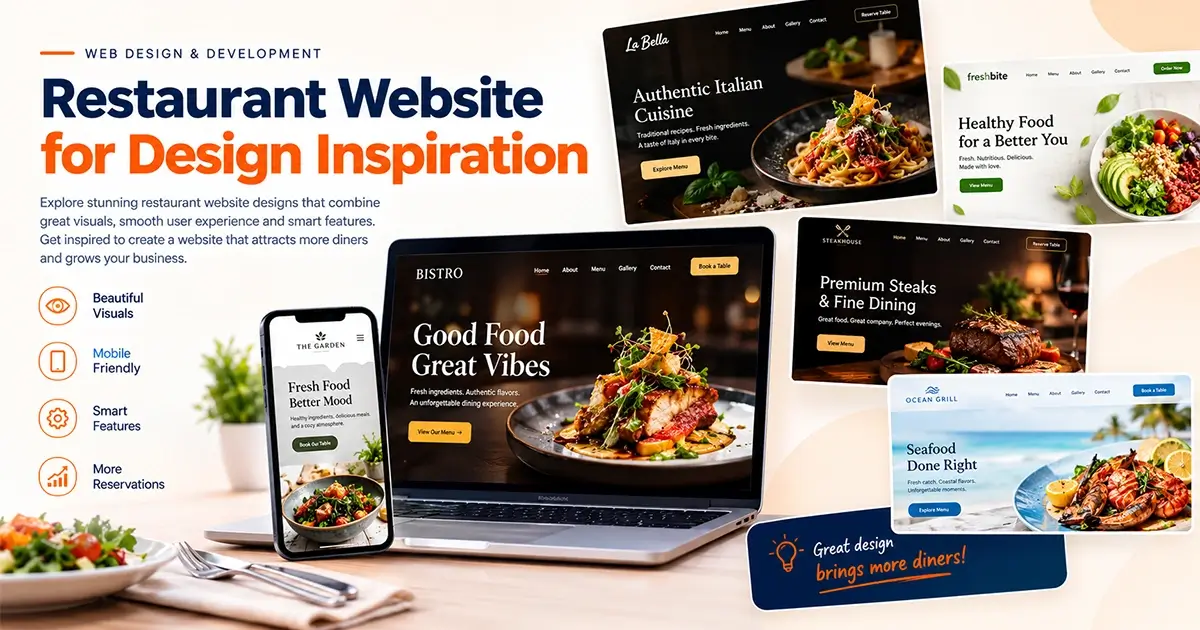
A great restaurant website does more than showcase delicious food. It communicates your restaurant’s personality, helps customers explore your menu, builds trust, and makes it easy to reserve a table or place an order.
Whether you run a fine-dining restaurant, café, pizzeria, bakery, cloud kitchen, or family restaurant, your website is an important part of your customers’ first impression.
Today’s customers often visit a restaurant’s website before deciding where to eat. They want to see the menu, check prices, view food photographs, find the location, and understand what makes your restaurant special.
If your website is difficult to navigate, slow to load, or missing essential information, potential customers may choose another restaurant.
So, what makes a restaurant website stand out?
In this guide, we explore 15 restaurant website design ideas and best practices that combine attractive visuals, practical functionality, mobile-friendly layouts, and conversion-focused design. You will also learn which features to prioritize when creating or redesigning your restaurant website.
Table of Contents
- Why Does Restaurant Website Design Matter?
- 15 Restaurant Website Design Ideas for Inspiration
- Essential Features Every Restaurant Website Needs
- Choosing the Right Design for Your Restaurant
- Common Restaurant Website Design Mistakes
- How to Build a Restaurant Website That Attracts Customers
- Frequently Asked Questions
- Final Thoughts
1. Why Does Restaurant Website Design Matter?
Your restaurant website is often the first place potential customers visit to learn about your food, atmosphere, and services.
A well-designed website helps customers make decisions quickly while communicating the quality and personality of your restaurant.
Here are four important benefits.
Create a Strong First Impression
High-quality food photography, appealing typography, thoughtful colors, and a clear layout help communicate your restaurant’s identity.
A premium restaurant may use elegant typography, sophisticated photography, and a refined color palette. A casual café might prefer brighter colors, friendly illustrations, and a relaxed visual style.
The design should reflect the actual dining experience you offer.
Make Your Menu Easy to Explore
Customers should be able to find your menu without searching through multiple pages.
A clear menu layout can display food categories, dish descriptions, prices, dietary information, and attractive photographs where appropriate.
Encourage Reservations and Orders
Your website should make it easy for customers to take the next step.
Depending on your business, this could mean reserving a table, ordering food online, calling the restaurant, or requesting catering services.
Improve Your Online Presence
A technically sound, mobile-friendly website with useful content can support your search engine optimization efforts.
Clear location details, opening hours, menu information, and well-structured pages also help customers find the information they need.
The goal is simple: create a website that looks appealing, answers customer questions, and makes taking action easy.
2. 15 Restaurant Website Design Ideas for Inspiration
The following ideas cover different restaurant styles and website layouts. Use them as inspiration and adapt the elements that suit your brand, audience, and business goals.
Idea 1: Minimalist Restaurant Website Design
Minimalist design focuses on simplicity, spacing, typography, and a small number of carefully selected visual elements.
Instead of filling every section with images, icons, and text, the design gives important content room to breathe.
Design elements to consider:
- A clean homepage layout
- Generous white space
- Simple navigation
- Elegant typography
- One strong food photograph
- A prominent menu or reservation button
This approach works particularly well for contemporary restaurants, boutique cafés, and businesses that want a refined visual identity.
Inspiration tip: Start with a simple homepage featuring your restaurant’s name, a short introduction, one striking food image, and a clear call to action.
Idea 2: Fine-Dining Restaurant Website
Fine-dining websites should communicate sophistication and attention to detail.
A dark background, elegant serif typography, subtle animations, and professional food photography can create an upscale atmosphere.
However, the design should remain easy to use. Important information such as opening hours, location, menu details, and reservations should never be difficult to find.
Design elements to consider:
- Black, charcoal, cream, or muted gold tones
- Large editorial-style photography
- Refined typography
- Carefully spaced layouts
- An elegant reservation experience
- A dedicated chef or culinary philosophy section
Best suited for: Luxury restaurants, tasting-menu experiences, premium steakhouses, and upscale dining establishments.
Idea 3: Modern Café Website
A café website should feel welcoming and reflect the atmosphere customers can expect when they visit.
Soft colors, natural lighting, coffee photography, and friendly typography can help communicate a relaxed experience.
Design elements to consider:
- Warm neutral backgrounds
- Coffee and pastry photography
- A concise drinks and food menu
- Café location and opening hours
- Wi-Fi or workspace information, if applicable
- Links to social media
For cafés that attract remote workers or students, practical information about seating, outlets, and available amenities can also be valuable.
Idea 4: Italian Restaurant Website
Italian restaurants can use rich food photography and warm colors to communicate tradition, hospitality, and the dining experience.
A homepage featuring pasta, pizza, fresh ingredients, or the restaurant interior can help establish the visual identity immediately.
Design elements to consider:
- Warm cream and terracotta tones
- Deep green or burgundy accents
- Editorial-style food photography
- A categorized Italian menu
- Information about ingredients and specialties
- A clear reservation button
Avoid relying on decorative Italian imagery alone. The design should reflect your restaurant’s actual food, story, and atmosphere.
Idea 5: Seafood Restaurant Website
Seafood restaurant websites can draw inspiration from coastal colors, fresh ingredients, and bright photography.
Blue, white, sand, and natural textures can create a fresh visual identity without overwhelming the food imagery.
Design elements to consider:
- Ocean-inspired colors
- High-quality seafood photography
- Clear descriptions of signature dishes
- Seasonal menu information
- Location and opening hours
- Reservation or ordering options
If your seafood menu changes frequently, use a content management system that allows your team to update dishes and prices easily.
Idea 6: Indian Restaurant Website
An Indian restaurant website can use rich colors, appetizing food photography, and clear menu categories to communicate its culinary identity.
The design should help customers understand the types of dishes available, whether the restaurant specializes in North Indian cuisine, South Indian food, regional specialties, vegetarian meals, or a combination.
Design elements to consider:
- Warm saffron, terracotta, cream, or deep green accents
- High-quality photographs of signature dishes
- Separate vegetarian and non-vegetarian categories, where relevant
- Spice-level indicators when useful
- Dietary and allergen information
- Delivery, takeaway, and reservation buttons
A well-organized menu is particularly important when a restaurant offers a large selection of dishes.
Idea 7: Pizza Restaurant Website
A pizzeria website should make its menu and ordering process easy to understand.
Customers often arrive with a specific goal: explore pizza options, compare sizes, customize toppings, or place an order.
Design elements to consider:
- Large pizza photography
- Clear menu categories
- Visible prices and sizes
- Simple topping and customization options
- An easy-to-use ordering button
- Delivery and collection information
For restaurants offering online ordering, keep the process straightforward and minimize unnecessary steps.
Idea 8: Burger and Fast-Casual Restaurant Website
Fast-casual restaurant websites benefit from bold imagery, clear offers, and simple navigation.
Customers should be able to find popular items, prices, meal combinations, and ordering options quickly.
Design elements to consider:
- Bold typography
- High-contrast buttons
- Appetizing burger and meal photography
- Clear combo and meal categories
- Prominent online ordering
- Mobile-friendly menu layouts
If you run promotions, display the terms and validity dates clearly so customers understand what is available.
Idea 9: Bakery and Dessert Website
Bakeries and dessert shops can use soft colors, elegant photography, and visually appealing product galleries.
The website should make it easy for customers to explore cakes, pastries, breads, cookies, and special-order products.
Design elements to consider:
- Pastel or warm neutral colors
- Product photography with consistent styling
- Dedicated cake and pastry categories
- Custom cake inquiry forms
- Seasonal collection highlights
- Pickup and delivery information
If customers order custom cakes, include fields for the event date, size, flavor, design preferences, and contact details.
Idea 10: Cloud Kitchen Website
Cloud kitchens operate differently from traditional dine-in restaurants. Customers may care more about menu discovery, delivery areas, ordering speed, and available payment methods than restaurant interiors.
Your website should reflect those priorities.
Design elements to consider:
- A clear menu-first homepage
- Prominent ordering buttons
- Food categories and prices
- Delivery area information
- Estimated delivery details when available
- Simple mobile navigation
If you operate multiple virtual food brands, make the relationship between those brands and the ordering experience clear.
Idea 11: Restaurant Website With Online Reservations
If table reservations are an important part of your business, make the booking process easy to find.
A reservation button should appear in a prominent location, such as the main navigation and homepage hero section.
Useful features include:
- Date selection
- Available time slots
- Party-size selection
- Customer contact details
- Booking confirmation
- Cancellation or modification information
You can integrate a suitable reservation platform rather than building a booking system from scratch.
Make sure customers receive clear confirmation and understand whether their reservation is complete or awaiting approval.
Idea 12: Restaurant Website With Online Ordering
For restaurants offering takeaway or delivery, online ordering can be an important part of the website experience.
Customers should be able to browse the menu, customize eligible items, review their order, and understand the total cost before completing payment.
Useful features include:
- Menu categories
- Item customization
- Cart and checkout
- Payment integration
- Delivery or collection options
- Order confirmation
Test the entire process on mobile devices before launch.
If you use a third-party ordering service, ensure the links and branding create a consistent customer experience.
Idea 13: Restaurant Website With a Full-Screen Hero Image
The hero section is the first prominent area visitors see when they arrive at your homepage.
A full-width image or carefully optimized video can help communicate your restaurant’s atmosphere and culinary style.
For example, a steakhouse might feature a beautifully plated signature dish, while a garden café could showcase its outdoor seating and natural surroundings.
An effective hero section should include:
- A clear headline
- A short supporting message
- One primary call to action
- Relevant, high-quality imagery
- Readable text with sufficient contrast
Avoid using oversized images that slow down the website or push essential information too far down the page.
Idea 14: Restaurant Website With a Storytelling Approach
Customers may want to know more than what is on the menu.
A restaurant’s story can communicate its culinary philosophy, family traditions, chef’s background, ingredient sourcing, or approach to hospitality.
A storytelling-focused website can help differentiate the restaurant from competitors.
Design elements to consider:
- An introduction to the restaurant
- The chef’s story
- Behind-the-scenes photography
- Information about ingredients and suppliers
- Signature dishes
- Customer testimonials, where genuine and permitted
Keep the story relevant to the customer. Use it to explain what makes the restaurant distinctive rather than filling the page with unnecessary background information.
Idea 15: Restaurant Website With a Mobile-First Design
Many customers browse restaurant websites on smartphones while deciding where to eat or what to order.
A mobile-first design ensures that the most important information is accessible on smaller screens.
Important mobile design features include:
- Readable text
- Easy-to-use navigation
- Fast-loading images
- Clear menu categories
- Touch-friendly buttons
- Accessible phone and map links
- Simple reservation and ordering flows
Test your website on different screen sizes and browsers.
Pay particular attention to menu readability, form fields, sticky navigation, and checkout usability.
A website should work well on mobile devices without sacrificing the desktop experience.
3. Essential Features Every Restaurant Website Needs
Visual inspiration is a useful starting point, but a successful restaurant website also needs practical functionality.
Here are the essential features to consider.
1. A Clear and Attractive Homepage
Your homepage should quickly communicate:
- Your restaurant’s name and cuisine
- What makes your restaurant distinctive
- Your location or service area
- Your main menu or signature dishes
- How visitors can reserve a table or place an order
Avoid making visitors scroll through several decorative sections before finding basic information.
2. An Easy-to-Read Online Menu
Your online menu should be easy to navigate on desktop and mobile devices.
Include dish names, descriptions, prices, and relevant dietary information.
If prices or dishes change regularly, avoid relying exclusively on a PDF menu that customers must download and zoom in to read.
A dedicated HTML menu is generally easier to browse on mobile devices and can provide search engines with readable page content.
3. Online Reservations
Restaurants that accept bookings should make reservations easy to access.
Use a suitable booking tool, clearly display availability, and communicate confirmation details.
Make sure your reservation system works properly across devices.
4. Online Ordering and Payment
If you offer online ordering, ensure customers can review their items, understand delivery charges, choose a delivery or collection option, and complete payment securely.
Display any minimum order values, delivery limitations, or additional charges before checkout.
5. Location, Opening Hours, and Contact Details
Customers should not have to search through multiple pages to find essential information.
Include your address, phone number, opening hours, and map directions where appropriate.
If your business has multiple branches, provide separate information for each location.
6. High-Quality Food Photography
Food photography can communicate the quality and personality of your restaurant more effectively than generic stock imagery.
Use authentic photographs whenever possible.
Optimize image sizes and formats to maintain visual quality without unnecessarily slowing down the website.
7. Reviews and Testimonials
Genuine customer feedback can help visitors understand what others appreciate about your restaurant.
If you display testimonials, use authentic feedback and obtain any necessary permission.
Avoid publishing fabricated reviews or misleading ratings.
8. Search Engine Optimization
A restaurant website should have a clear structure and useful content that helps search engines understand the business.
Consider implementing:
- Descriptive page titles and meta descriptions
- Search-friendly URLs
- Logical headings
- Relevant internal links
- Appropriate restaurant or local-business structured data
- An XML sitemap
- Optimized images
- Accurate location and contact information
Structured data can help search engines interpret your information, but it does not guarantee enhanced search results or higher rankings.
9. Social Media Integration
If your restaurant actively uses social media, link to the appropriate profiles.
You can also use selected social content to show your dishes, atmosphere, events, and special offers.
Make sure social media integrations do not slow down the website or distract visitors from important actions.
10. Accessibility and Performance
Your website should be usable by people with different abilities and work reliably across common devices and browsers.
Use readable typography, sufficient color contrast, descriptive links, keyboard-accessible navigation, and appropriate image text alternatives.
Test performance and fix problems that make important pages slow or difficult to use.
4. Choosing the Right Design for Your Restaurant
There is no single restaurant website design that works for every business.
The right approach depends on your cuisine, brand personality, customer expectations, and business model.
Use the following table as a starting point.
| Restaurant type | Recommended visual direction | Main priority |
|---|---|---|
| Fine dining | Elegant, refined, editorial | Reservations and brand experience |
| Café | Warm, relaxed, minimal | Menu, location, and opening hours |
| Indian restaurant | Rich colors and appetizing imagery | Menu clarity and ordering |
| Pizzeria | Bold, energetic, food-focused | Online ordering |
| Bakery | Soft, elegant, product-led | Product discovery and custom orders |
| Cloud kitchen | Simple, functional, mobile-first | Delivery and checkout |
| Seafood restaurant | Fresh, bright, coastal | Menu, freshness, and reservations |
| Family restaurant | Welcoming, accessible, friendly | Menu, location, and family information |
| Multi-location restaurant | Consistent branding and structured location pages | Branch discovery and accurate information |
Should You Use WordPress for Your Restaurant Website?
WordPress can be a practical option for restaurants that want to manage menus, update photographs, publish announcements, and maintain their website without requiring a developer for every change.
Depending on your requirements, you can use a suitable theme, page builder, menu solution, reservation integration, or ordering platform.
For more complex ordering, loyalty programs, integrations, or multi-location operations, evaluate the available solutions carefully before choosing your platform.
The best choice is the one that meets your requirements while remaining manageable, secure, and cost-effective.
5. Common Restaurant Website Design Mistakes
Even an attractive restaurant website can lose customers if important information or functionality is missing.
Avoid these common mistakes.
Mistake 1: Hiding the Menu
Visitors should be able to find your menu quickly.
Place a clear menu link in the main navigation and make sure the menu works well on mobile devices.
Mistake 2: Using Poor-Quality Images
Blurry or poorly lit food photographs can weaken the visual presentation of your restaurant.
Use clear, relevant images that represent your actual dishes and atmosphere.
Mistake 3: Making Reservations Difficult
If customers need to navigate through multiple pages to find a reservation form, the process may feel unnecessarily complicated.
Keep the booking option visible and reduce unnecessary steps.
Mistake 4: Ignoring Mobile Users
Small buttons, horizontal scrolling, unreadable menus, and difficult forms can frustrate smartphone users.
Test the complete customer journey on mobile devices.
Mistake 5: Overloading the Website With Animations
Animations can add personality, but excessive movement may distract visitors and affect performance.
Use motion purposefully and provide appropriate controls for animated content where needed.
Mistake 6: Forgetting Basic Business Information
Always provide accurate opening hours, location details, contact information, and relevant ordering or reservation instructions.
Update this information when your business hours or services change.
Mistake 7: Ignoring Website Maintenance
Outdated plugins, broken forms, expired offers, and inaccurate menu prices can undermine customer confidence.
Review your website regularly and maintain reliable backups and security updates.
6. How to Build a Restaurant Website That Attracts Customers
Once you have selected your preferred design direction, follow a structured development process.
Step 1: Define Your Website Goals
Decide what you want the website to accomplish.
Your primary goal might be table reservations, takeaway orders, delivery sales, catering enquiries, or increased visits to your physical location.
Your website structure should support these goals.
Step 2: Understand Your Customers
Consider what customers need to know before choosing your restaurant.
Do they care most about the menu, pricing, atmosphere, dietary options, location, delivery availability, or reservations?
Use these priorities to decide which information should appear first.
Step 3: Plan Your Website Pages
A typical restaurant website may include:
- Home
- About Us
- Menu
- Reservations
- Online Ordering
- Gallery
- Contact and Location
You may not need every page. Choose the structure that fits your restaurant’s services.
Step 4: Create a Visual Direction
Choose a color palette, typography, image style, and layout that reflect your brand.
Review restaurant website examples for inspiration, but avoid copying another restaurant’s design wholesale.
Your website should have its own identity.
Step 5: Develop the Website
Select a suitable platform and implement the approved design.
Build responsive layouts, configure the required integrations, optimize images, and ensure that important information remains easy to manage.
Step 6: Test Before Launch
Before publishing, test:
- Mobile and desktop layouts
- Navigation links
- Menu displays and prices
- Reservation forms
- Ordering and payment workflows
- Phone and map links
- Website speed
- Browser compatibility
- Accessibility basics
- SEO settings and redirects, where applicable
If your website accepts payments, test the complete ordering process in the appropriate test environment before going live.
Step 7: Measure and Improve
After launch, review how visitors use your website.
Where appropriate, track menu views, reservation submissions, ordering activity, phone clicks, and other meaningful actions.
Use the results to identify usability problems and prioritize improvements.
7. Frequently Asked Questions
What makes a good restaurant website design?
A good restaurant website combines attractive food photography, clear navigation, an easy-to-read menu, accurate business information, mobile-friendly layouts, and prominent reservation or ordering options.
The design should reflect the restaurant’s identity while making essential information easy to find.
How much does it cost to build a restaurant website?
The cost depends on the design, number of pages, booking requirements, online ordering, payment integrations, content creation, and maintenance needs.
A simple informational website generally requires less development than a custom ordering platform or a multi-location restaurant system. Request a quotation based on your actual requirements.
Is WordPress good for restaurant websites?
Yes. WordPress can be suitable for many restaurant websites, particularly when owners need to update menus, images, opening hours, and announcements.
Reservations and online ordering can be added through suitable integrations, depending on the required functionality.
Should a restaurant website include online ordering?
If your restaurant offers takeaway or delivery, online ordering may make the purchasing process more convenient for customers.
Choose a solution that supports your menu, delivery areas, payment methods, and operational workflow.
How can I make my restaurant website mobile-friendly?
Use a responsive layout, readable text, optimized images, touch-friendly buttons, simple navigation, and forms that work comfortably on smaller screens.
Test the entire process, from viewing the menu to making a reservation or completing an order.
Does restaurant website design affect SEO?
Website design can influence usability, mobile experience, performance, and how content is organized. These elements can support your overall SEO strategy.
However, design alone does not guarantee search rankings. Useful content, technical implementation, competition, local relevance, and other factors also matter.
How often should I update my restaurant website?
Update your website whenever your menu, prices, opening hours, location details, or services change.
You should also review website functionality, security, performance, and content regularly.
Final Thoughts
Restaurant website design is about more than creating a beautiful online presence. It is about helping customers discover your restaurant, understand your menu, trust your brand, and take the next step.
Whether you prefer a minimalist café layout, an elegant fine-dining experience, a colorful Indian restaurant website, or a streamlined online ordering system, the design should reflect your business and meet your customers’ needs.
Start with a clear structure, high-quality photography, accurate information, and an easy-to-use mobile experience. Then add the features that support your restaurant’s goals.
The best restaurant website is one that combines a memorable brand experience with practical functionality.
Need a Professional Restaurant Website?
At W3Dezine, we help businesses create modern, responsive websites tailored to their goals and audiences.
If you are launching a new restaurant, redesigning an existing website, or looking for a better way to present your menu and services online, the right website strategy can help you create a stronger digital presence.
Let’s discuss your website project.
Visit W3Dezine to explore our website design and development services.